Convert a cdb database cdb pdb
In this post explain how to convert a non-CDB database into a PDB database PDB an existing container using the "Plugging aCDB a CDB" method .
We'll start with the following scenario:
On one machine, we have a non-CDB database named "test" that we're going to migrate to a PDB in a multitenant database (CDBORCL) installed on the same machine and running the same version.
Machine: oracle19cdb1
Source: Oracle 19c (19.3.0.0.0) -> Non-CDB (test)
Destination: Oracle 19c (2(19.3.0.0.0) ) -> CDB (CDBORCL) ->
1- Prerequisites and Prior Validations
Before we begin, we check to make sure the database settings are compatible.
We verify that the source and destination character sets are compatible.
Database: test
SQL > SELECT * FROM v$nls_parameters WHERE parameter IN ('NLS_CHARACTERSET', 'NLS_NCHAR_CHARACTERSET');
PARAMETER VALUE
—————————————————————- ————————-
NLS_CHARACTERSET AL32UTF8
NLS_NCHAR_CHARACTERSET AL16UTF16
Container database: CDBORCL
SQL > SELECT * FROM v$nls_parameters WHERE parameter IN ('NLS_CHARACTERSET', 'NLS_NCHAR_CHARACTERSET');
PARAMETER VALUE
—————————————————————- ————————-
NLS_CHARACTERSET AL32UTF8
NLS_NCHAR_CHARACTERSET AL16UTF16
We verify that there are no components or options that are not supported by the PDB databases.
SQL > select comp_id, version, status from dba_registry:
COMP_ID VERSION STATUS
—————————— —————————— ——————————————–
CATALOG 19.0.0.0.0 VALID
CATPROC 19.0.0.0.0 VALID
RAC 19.0.0.0.0 OPTION OFF
JAVAVM 19.0.0.0.0 VALID
XML 19.0.0.0.0 VALID
CATJAVA 19.0.0.0.0 VALID
APS 19.0.0.0.0 VALID
XDB 19.0.0.0.0 VALID
OWM 19.0.0.0.0 VALID
CONTEXT 19.0.0.0.0 VALID
ORDIM 19.0.0.0.0 VALID
SDO 19.0.0.0.0 VALID
XOQ 19.0.0.0.0 VALID
OLS 19.0.0.0.0 VALID
DV 19.0.0.0.0 VALID
2 – Set theCDB databaseCDB read-only mode
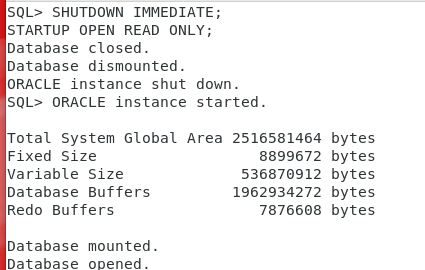
It is recommended that you set the database to read-only mode to prevent changes while generating the XML.
SHUTDOWN IMMEDIATE;
STARTUP OPEN READ-ONLY;
3 – Generate a descriptive file at XML (non- CDB)
We generate the file ` xml`, which will store the description of the `non-cdb ` database that will be used to import data into the ` CDB` database.
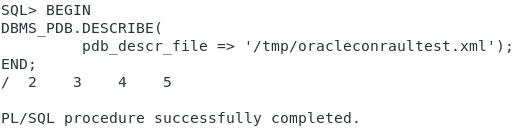
BEGIN
DBMS_PDB.DESCRIBE(
pdb _descr_file => ‘/tmp/oracleconraultest.xml’);
END;
/
4 – Check compatibility ( CDB database)
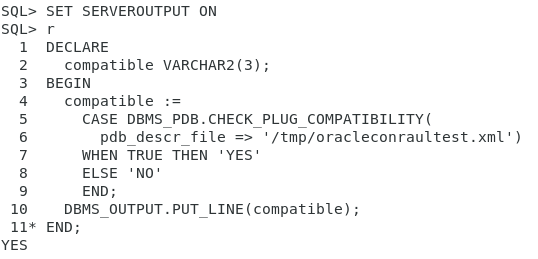
Before adding the database to the container CDB (CDBORCL), you need to check whether it is compatible. To do this, run the following command.
SET SERVEROUTPUT ON
DECLARE
compatible VARCHAR2(3);
BEGIN
compatible :=
CASE DBMS_PDB.CHECK_PLUG_COMPATIBILITY(
pdb_descr_file =>'tmp/oracleconraultest.xml')
WHEN TRUE THEN 'YES'
ELSE 'NO'
END;
DBMS_OUTPUT.PUT_LINE(compatible);
END;
/
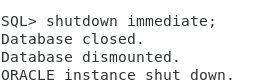
Before moving on to the next step, we take the CDB database offline.
IMMEDIATE SHUTDOWN;
5. Create the PDB
There are two ways to create the PDB.
One option would be to reuse the current datafiles without making a copy of the database (NOCOPY option). Another option is to use the COPY option, which creates a backup of the database's datafiles.
Since we're on the same machine, we'll use NOCOPY, which will obviously make the process faster, since it doesn't have to make a copy of the data files.
If you choose this option, it's highly recommended that you perform a backup before running the process.
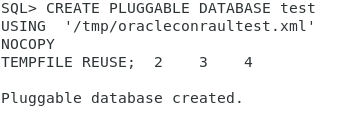
CREATE PLUGGABLE DATABASE test
USING ‘‘tmp/oracleconraultest.xml‘
NOCOPY
TEMPFILE REUSE;
If you want to copy the datafiles to a new ASM location
SCREATE PLUGGABLE DATABASE test
USING ‘/tmp/noncdb.xml’
COPY
FILE_NAME_CONVERT =
(
‘+DATA/NONCDB/’,
‘+DATA/CDB19/TEST/’
);
On the same ASM machine, NOCOPY is ASM used, minimizing space and time.
CREATE PLUGGABLE DATABASE test
USING ‘‘tmp/oracleconraultest.xml‘
NOCOPY
TEMPFILE REUSE;
6. Open the database in restricted mode.
We open the database in restricted mode in the CDB.
ALTER PLUGGABLE DATABASE TEST OPEN RESTRICTED;

We checked the errors and saw that the script still needs to be run.
SELECT name, cause, type, message, status
FROM pdb_plug_in_violations
WHERE name = 'TEST'
ORDER BY time;

7. Running the CDB conversion script
We're switching the session to the pdb , which we're going to change to "test."
ALTER SESSION SET CONTAINER=TEST;
And we run the conversion:
@$ORACLE_HOME/rdbms/admin/noncdb_to_pdb.sql
Once it's finished, we can see that the conversion was successful.

To prevent the TEST database from starting in mounted mode on the next reboot, run the following command while the database is open.
ALTER PLUGGABLE DATABASE TEST SAVE STATE;
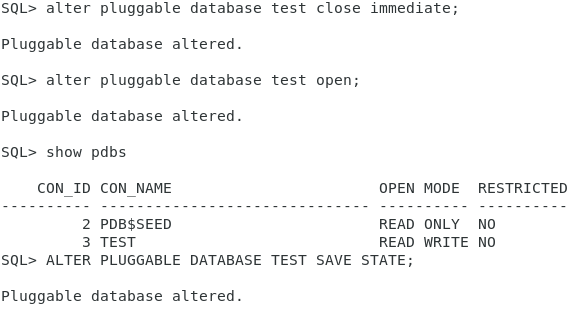
With that, we would have converted our CDB database CDB PDB.